> ## Documentation Index
> Fetch the complete documentation index at: https://clarity.rocktangle.com/docs/llms.txt
> Use this file to discover all available pages before exploring further.
# Auto coaching
> Get private coaching suggestions automatically after you send messages
Auto coaching monitors your messages in real time and privately suggests improvements when something could land better.
 ## How it works
1. **You send a message** in a channel where auto coaching is enabled.
2. **Clarity analyzes it** against your active coaching flags.
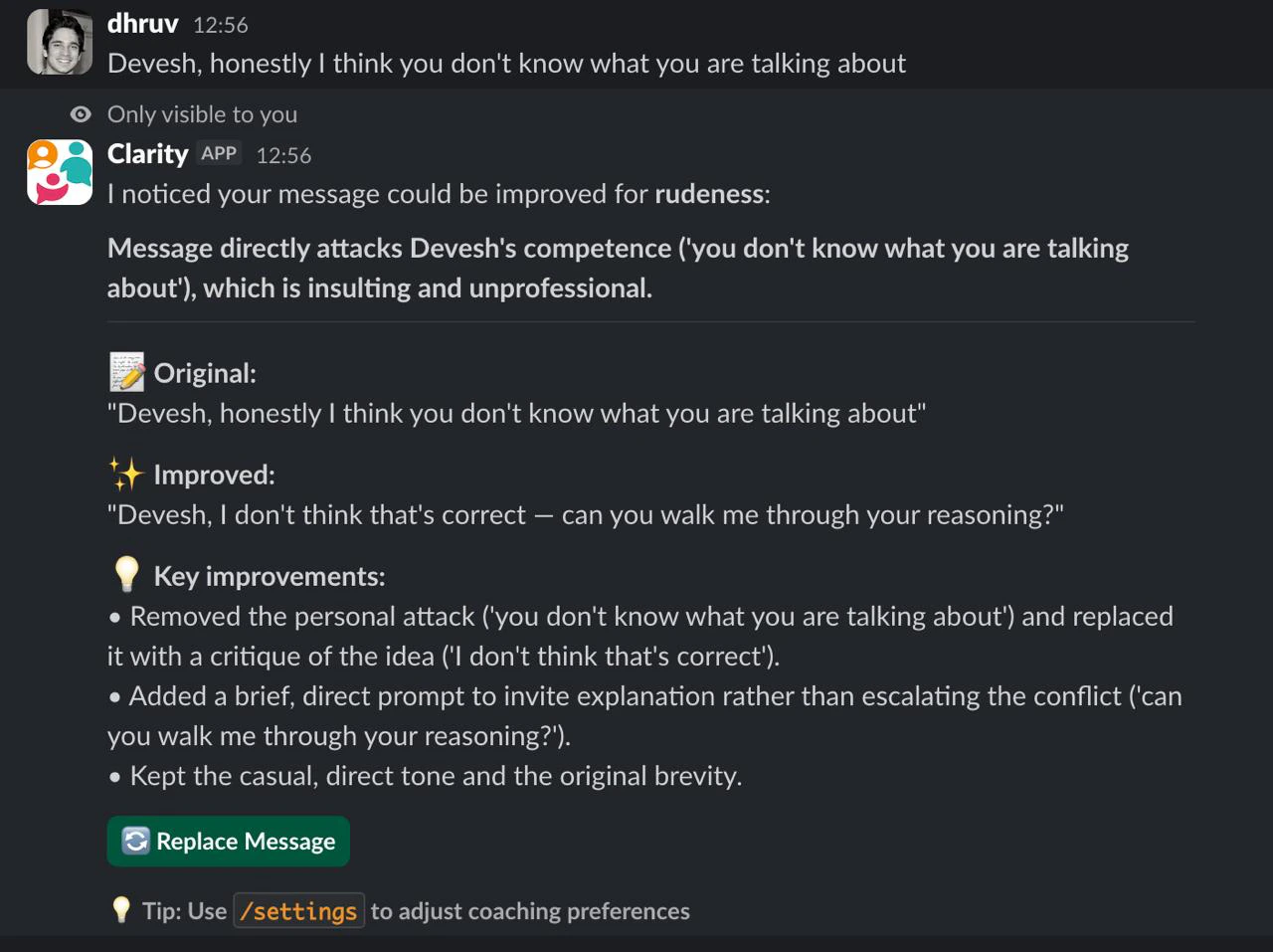
3. **If a flag is triggered**, you receive a private suggestion that only you can see.
4. **You decide**: click **Replace** to update your original message, or **Didn't like it** to dismiss.
Only you can see the coaching suggestion. Your teammates see your original message until you choose to replace it.
## Enabling auto coaching
Run `/clarity-settings` to open the settings modal. In the **Auto coaching channels** section, check the channels where you want coaching enabled, then click **Save**.
Start with one or two busy channels to get a feel for the suggestions before enabling more.
## What the suggestion looks like
When Clarity finds something to improve, you see a private message like this:
```
Disrespectful · Dismissive
"Your original message..." → "Improved version..."
[Replace] [Didn't like it]
Only you can see this
```
* **Replace** — updates your original message in the channel with the improved version
* **Didn't like it** — dismisses the suggestion
## Coaching flags
Auto coaching uses your active flags to decide what to look for. The five default flags are:
| Flag | What it catches |
| ----------------------------- | ------------------------------------------------------------ |
| Disrespectful | Directly demeaning, insulting, or hostile language |
| Passive-Aggressive | Indirect frustration masked by politeness or veiled digs |
| Dismissive | Shutting down discussion without engaging with the substance |
| Unclear / Not Actionable | Vague requests missing essential details needed to act |
| Unconstructive / Demoralizing | Sweeping negativity about the work with no path forward |
All five are enabled by default. You can toggle them in [Settings](/settings).
Some messages can't be improved by rewording — hate, harassment, threats, or a personal attack on someone. For these, Clarity shows a private warning and a de-escalation tip instead of a rewrite. It never helps you send harmful content.
Pro users can create up to 15 custom flags. See [Settings](/settings) for details.
## Usage limits
Auto coaching suggestions count toward your monthly limit:
| Plan | Monthly limit |
| ---- | --------------- |
| Free | 5 suggestions |
| Pro | 200 suggestions |
Check your current usage with `/clarity-status`.
## How it works
1. **You send a message** in a channel where auto coaching is enabled.
2. **Clarity analyzes it** against your active coaching flags.
3. **If a flag is triggered**, you receive a private suggestion that only you can see.
4. **You decide**: click **Replace** to update your original message, or **Didn't like it** to dismiss.
Only you can see the coaching suggestion. Your teammates see your original message until you choose to replace it.
## Enabling auto coaching
Run `/clarity-settings` to open the settings modal. In the **Auto coaching channels** section, check the channels where you want coaching enabled, then click **Save**.
Start with one or two busy channels to get a feel for the suggestions before enabling more.
## What the suggestion looks like
When Clarity finds something to improve, you see a private message like this:
```
Disrespectful · Dismissive
"Your original message..." → "Improved version..."
[Replace] [Didn't like it]
Only you can see this
```
* **Replace** — updates your original message in the channel with the improved version
* **Didn't like it** — dismisses the suggestion
## Coaching flags
Auto coaching uses your active flags to decide what to look for. The five default flags are:
| Flag | What it catches |
| ----------------------------- | ------------------------------------------------------------ |
| Disrespectful | Directly demeaning, insulting, or hostile language |
| Passive-Aggressive | Indirect frustration masked by politeness or veiled digs |
| Dismissive | Shutting down discussion without engaging with the substance |
| Unclear / Not Actionable | Vague requests missing essential details needed to act |
| Unconstructive / Demoralizing | Sweeping negativity about the work with no path forward |
All five are enabled by default. You can toggle them in [Settings](/settings).
Some messages can't be improved by rewording — hate, harassment, threats, or a personal attack on someone. For these, Clarity shows a private warning and a de-escalation tip instead of a rewrite. It never helps you send harmful content.
Pro users can create up to 15 custom flags. See [Settings](/settings) for details.
## Usage limits
Auto coaching suggestions count toward your monthly limit:
| Plan | Monthly limit |
| ---- | --------------- |
| Free | 5 suggestions |
| Pro | 200 suggestions |
Check your current usage with `/clarity-status`.