> ## Documentation Index
> Fetch the complete documentation index at: https://clarity.rocktangle.com/docs/llms.txt
> Use this file to discover all available pages before exploring further.
# Welcome to Clarity
> AI-powered communication coaching for Slack
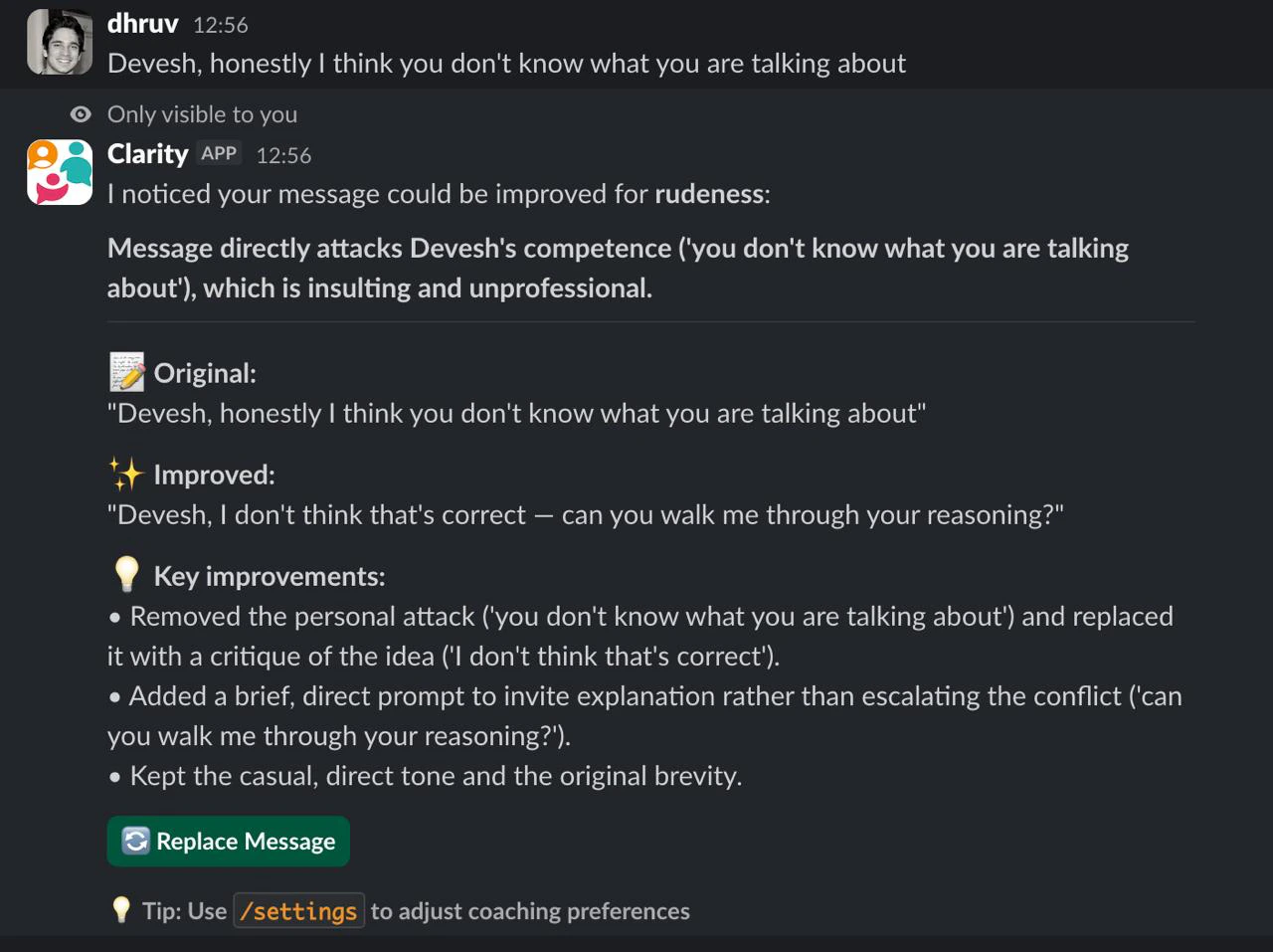
Clarity is a Slack bot that coaches you to communicate more clearly, kindly, and effectively. It monitors your messages in real time and privately suggests improvements when something could land better.
 ## Get started
Install Clarity in your Slack workspace in under two minutes.
Rephrase messages, check status, and manage settings with slash commands.
Get private suggestions automatically after you send a message.
Choose coaching flags, target style, digest cadence, and monitored channels.
## How it works
When you send a message that could be improved, Clarity sends you a private suggestion that only you can see. Click **Replace** to update your original message, or **Didn't like it** to dismiss.
Clarity analyzes messages as you send them in channels where coaching is enabled. No setup beyond picking your channels.
Clarity checks for disrespectful, passive-aggressive, dismissive, unclear, and unconstructive/demoralizing messages out of the box. Pro users can add custom flags.
Messages that can't be improved by rewording — hate, harassment, threats, or a personal attack — get a private warning and a de-escalation tip instead of a rewrite. Clarity won't help you send harmful content.
Clarity can DM you a daily or weekly digest summarizing how your messages came across. If you set a target style, the digest compares your actual writing against it.
Messages are analyzed in real time and not stored after analysis. Only you see coaching suggestions.
## Need help?
Common questions and fixes.
## Get started
Install Clarity in your Slack workspace in under two minutes.
Rephrase messages, check status, and manage settings with slash commands.
Get private suggestions automatically after you send a message.
Choose coaching flags, target style, digest cadence, and monitored channels.
## How it works
When you send a message that could be improved, Clarity sends you a private suggestion that only you can see. Click **Replace** to update your original message, or **Didn't like it** to dismiss.
Clarity analyzes messages as you send them in channels where coaching is enabled. No setup beyond picking your channels.
Clarity checks for disrespectful, passive-aggressive, dismissive, unclear, and unconstructive/demoralizing messages out of the box. Pro users can add custom flags.
Messages that can't be improved by rewording — hate, harassment, threats, or a personal attack — get a private warning and a de-escalation tip instead of a rewrite. Clarity won't help you send harmful content.
Clarity can DM you a daily or weekly digest summarizing how your messages came across. If you set a target style, the digest compares your actual writing against it.
Messages are analyzed in real time and not stored after analysis. Only you see coaching suggestions.
## Need help?
Common questions and fixes.